Picture Transfer Protocol
Tethr が基盤とするカメラのテザーシステムのための通信プロトコル。
Tethrに新しいカメラをサポートさせたい
WireSharkでのリバースエンジニアリング方法
- Apple SiliconでUSB Trafficを覗き見る
- Wiresharkをインストール
- SIPを無効にする
- Wiresharkに表示されているXHCから始まるポートそれぞれに、
sudo ifconfig XHC0 upを実行する XHR#のうちのいずれかがUSBカメラ- 送受信パケットのうち
- Infoが以下のものをチェック。(submitted) がつく行を無視する
- URB_BULK out (completed):PC → カメラ
- URB_BULK in (completed): カメラ → PC
- Leftover Capture Dataから読んでいく
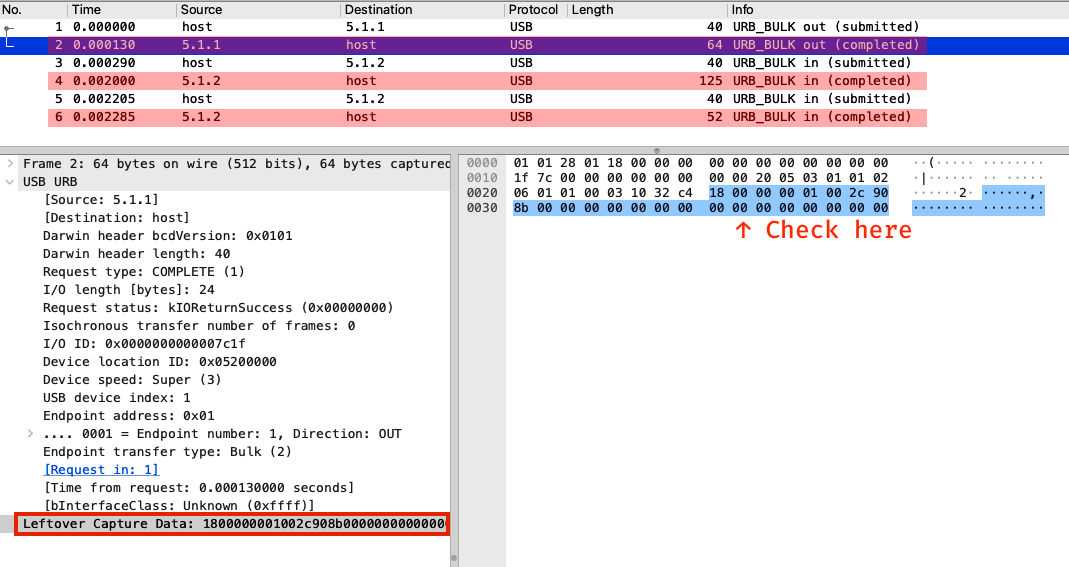
- Infoが以下のものをチェック。(submitted) がつく行を無視する
PTPのコミュニケーションの流れ
3つのデータ送受信タイプが存在する
SendCommand: カメラに短いコマンドを送信する
transferOutCommand (PTPType.Command): OpCodeを送信waitBulkIn (PTPType.Response): カメラからのレスポンス
SendData: カメラに長いデータを送信する
transferOutCommand (PTPType.Command): OpCodeを送信transferOutData (PTPType.Data): 実データを送信waitBulkIn (PTPType.Response): カメラからのレスポンス
ReceiveData: カメラからデータを取得する
transferOutCommand: 問い合わせたいOpCodeを送る- 成功した場合
waitBulkIn: カメラから本データを受信waitBulkIn: 最後のレスポンス
- カメラが何らかの理由で実データを用意できない場合
waitBulkIn (PTPType=Response): 失敗コードを代わりに送る
パケットの構造
PTPType.Command(PC→カメラに)
0c 00 00 00 // Length: 0x0000000c = 12 bytes (Leftover Capture Dataのバイト数と一致)
01 00       // PTPType: 0x0001 = Command
01 10       // OpCode: 0x1001 = GetDeviceInfo
12 00 00 00 // Transaction ID: 0x12 = 18PTPType.Data(PC→カメラ、カメラ→PCの両方)
21 01 00 00 // Length
02 00       // PTPType: 0x0002 = Data
01 10       // OpCode: 0x1001 = GetDeviceInfo
12 00 00 00 // Transaction ID: 0x12 = 18
... // 実データPTPType.Response(カメラ→PCに)
0c 00 00 00 // Length
03 00       // PTPType: 0x0003 = Response
01 20       // PTPResponse: 0x2001 = OK
12 00 00 00 // Transaction ID: 0x12 = 18